NPGS System Description
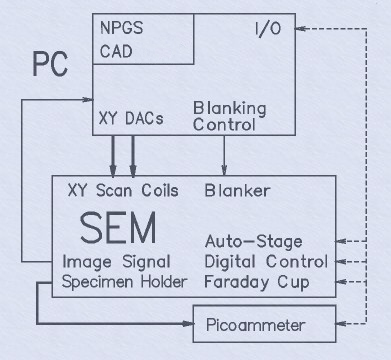 Required
Connections (bold arrows):
Required
Connections (bold arrows):
- Analog XY Inputs; +/-3v to +/-10v range typical, other ranges can be supported; >5k ohms impedance typical, >2k ohm is supported.
- Picoammeter; A picoammeter that can read the beam current hitting the sample is required for lithography. Typically, an external picoammeter is connected to the specimen current output from the microscope stage, or less often, a picoammeter will be built into the microscope. When a Keithley 6485 Picoammeter is used, it can be read from NPSG through a serial interface..
Typical Connections (thin arrows):
- Image Signal; within +/-10v; used for NPGS Alignment feature.
- Blanker; within +/-5v, <200 mA; fast blankers, slow shutters, and systems with no blankers are all supported.
Optional Connections (dashed arrows):
- Automated Stage; interface programs for several common automated stages are available at no charge. Any automated stage can be supported, if the serial interface protocol is available.
- Digital Microscope Control; interface programs for almost all common digital microscopes are available at no charge. Any digital microscope can be supported, if the complete serial or Ethernet interface protocol is available.
- Faraday Cup & Picoammeter; NPGS can optionally be connected to control a Faraday cup and/or read from a picoammeter, but most systems will have a manually controlled Faraday cup and picoammeter.
Software:
- NPGS - Version 9.2 (site-license included; see "Upgrade History" for a listing of the most advanced features.)
- QCAD Professional v3.27 (site-license included; unlimited use for educational institutions).
- 64 bit Windows 10 Pro (when PC is included).
Hardware:
- 16-bit High speed PCIe516 lithography board.
- Cables to connect NPGS to microscope.
- Optional relay adapter to share microscope input with another accessory, typically an EDX system.
- Workstation PC with (or better):
- 8 GB RAM, 500 Gb Hard Disk, DVDRW Drive.
- 24" LCD Monitor.
- LAN, USB, Serial Port.
NPGS Installation Guide:
- Detailed installation instructions for nearly every microscope.
- How to calibrate absolute pattern size and aspect ratio.
- Checklist for testing and characterizing the microscope.
- Interface instructions for serial or Ethernet microscope interface, as appropriate.
NPGS User's Manual including:
- Detailed instructions for NPGS software.
- Detailed tutorial on how to set up and run a Scanning Electron Microscope for writing nanometer patterns.
- Sample patterns and run parameters.
- Solutions to Problems section covering nearly all common microscope and/or lithography problems.
NPGS Training:
- Optional on-site user training (see "Questions & Answers" page for required and recommended equipment for on-site training)
The user must supply:
- SEM, STEM, FIB, HIM (Helium Ion Microscope), or dual* SEM/FIB with:
- XY External Scan Control Input (within +/- 3 to +/- 10 volts, >2k ohms).
- Image Signal Output (within +/- 10 volts).
- Picoammeter for Measuring Beam Current (0.1 pA resolution or better; typically Keithley 6485).
- *A dual SEM/FIB can have both beams controlled by NPGS, but only one at a time where either a software or hardware switch (depending on microscope model) will select the writing mode.
Recommended:
- Beam Blanker with rise/fall times <1 usec (digital input within +/- 5 v and <200 mA).
- (Slow Beam Shutter or no blanker will also work).
- Fine Z stage control to ~1um.
- Faraday Cup (apertures to make cup are included with NPGS).
- Scan Rotation Option.
- Gold on Carbon SEM standard mounted on sample holder.
- Stray AC less than 3x10⁻⁷ Tesla(p-p); Magnetic shielding for chamber or active field cancelling system can reduce interference.
- Vibration less than 2x10⁻⁶ meters(p-p) over 5 Hz.
Other Configurations: (NPGS Software is Identical to Full System)
The user may supply any of the following:
- Workstation PC.
- Installation.
Minimum computer requirements for NPGS v9 and higher:
- > 2 GHz CPU recommended.
- Windows XP (32 or 64 bit Win7/10 Pro recommended).
- 256 MB RAM (2 GB or more recommended).
- CD ROM.
- 1 available PCIe Slot (for full length board, 12.3" = 31.2 cm).
- 1280x1024 Graphics.
- Serial Ports and/or Ethernet interface may be required for optional control of a stage and/or SEM.
NPGS Updates:
NPGS software updates are available at no charge to current* NPGS users. See "Upgrade History" for a listing of the most advanced features. (*This includes all original owners of NPGS who have purchased a full version of the NPGS v9 software.)